ERP for inventory, supply, production and sales

A modular ERP for small and mid-sized businesses

Inventory, supply, production and sales — with an AI assistant that turns plain language into system actions and never posts anything without confirmation.
  • Stock and lots
  • Supply
  • Formula-based production
  • Sales
  • AI assistant
  • Integrations
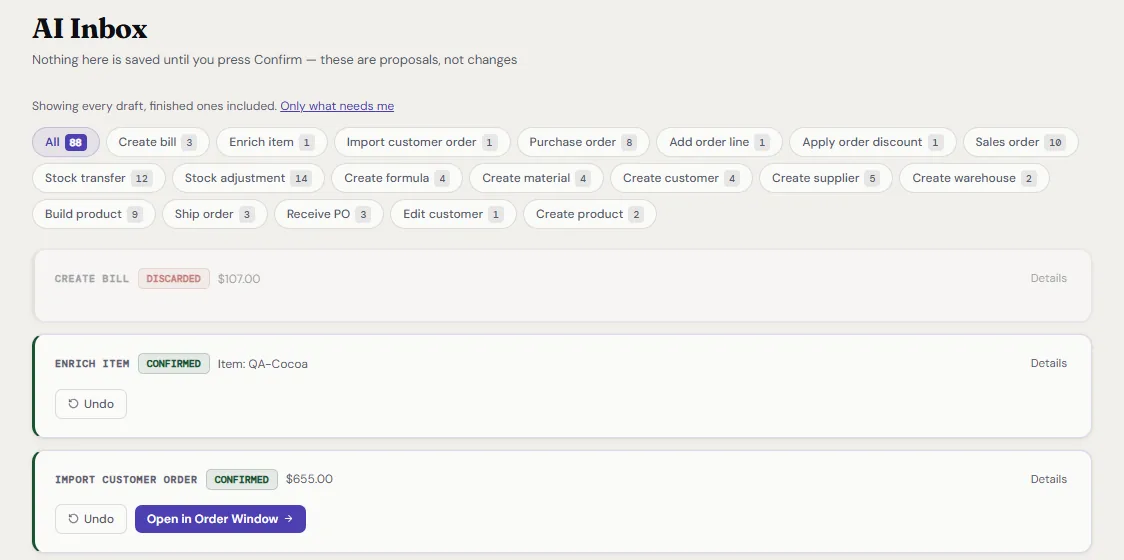
The AI Inbox screen: a list of AI-proposed actions such as create bill, enrich item and import customer order, each marked discarded or confirmed, with Undo buttons on confirmed ones.
AI inbox: nothing is saved until you confirm, and posted actions can be undone. Test data.

AI assistant

An interpreter between people and the system: it proposes, a person confirms, the system posts

  1. 1

    Words, a photo or a file

    An order, a delivery or a stock question — no hunting for the right button.

  2. 2

    The AI proposes an action

    A draft of what it would do, not a change.

  3. 3

    A person confirms

    You see exactly what will happen before anything is saved.

  4. 4

    The system posts it

    Under the same rules and checks as manual entry.

  5. 5

    Logged, and can be undone

    Every step is recorded: who did what, and when.

42 kinds of actions

Across stock, purchasing, sales, production and master data. Create an order, book a delivery, check stock — in words or with a photo of a document.

Questions about your data

On-hand, reservations, expiry, margin and lot trace, answered from your own records.

Documents become drafts

A supplier bill, a customer order, a price list or a stock-count sheet becomes a draft that only needs checking.

The AI cannot write anything on its own. A confirmed action goes through the same checks as manual entry, lands in the log and can be undone. AI spend is capped by a per-company budget.

Structure

A core, modules and industry packs: switch on only what you need

For you it is one application. You take the shared core and only the modules you need, and add more later without moving to another system.

Core

every customer has it
  • Organisation, roles & audit
  • Items & units
  • Stock, lots & movement ledger

Modules

switched on as you need them

Purchasing

  • Suppliers & purchase orders
  • Purchase planning
  • Supplier bills

Sales

  • Customers & orders
  • Shipments & returns
  • Customer invoices
  • Customer portal & CRM

Production

  • Formulas & production
  • Subcontracting
  • Quality & losses
  • Work centres Planned

Services

  • AI assistant
  • Accounting & integrations
  • API
  • Reports

Industry packs

Coming
  • Specialty food
  • Chemicals & compounds
  • Cosmetics
  • Pet food
  • Supplements

An industry pack adds ready-made settings, fields, documents and reports for an industry, without a long implementation. Packs are built on top of the modular structure and are not in the product yet.

Today ainventry is one system in which sections can be switched off; the split into separately switchable modules and packs is being completed.

In the product today

A working product for formula-based production

Grown from a real manufacturer's request, so the hardest parts were built first: formulas, lots and work with outside processors. Stock and lots, purchasing, formula-based production, customer orders, documents, the AI assistant, an accounting connection and a public API are in place.
Stock and lots are the strongest part: a recall is a single query

  • Lots with expiry dates; the lot that expires first is picked first. A quarantined lot is never picked automatically.
  • Traceability forward and back: from raw material to finished lot to the customers it shipped to.
  • Virtual warehouses: in transit, at the processor, work in progress, quarantine.
  • On-hand stock is derived from a movement ledger that can only be added to, so any number can be explained and rebuilt as of any date.
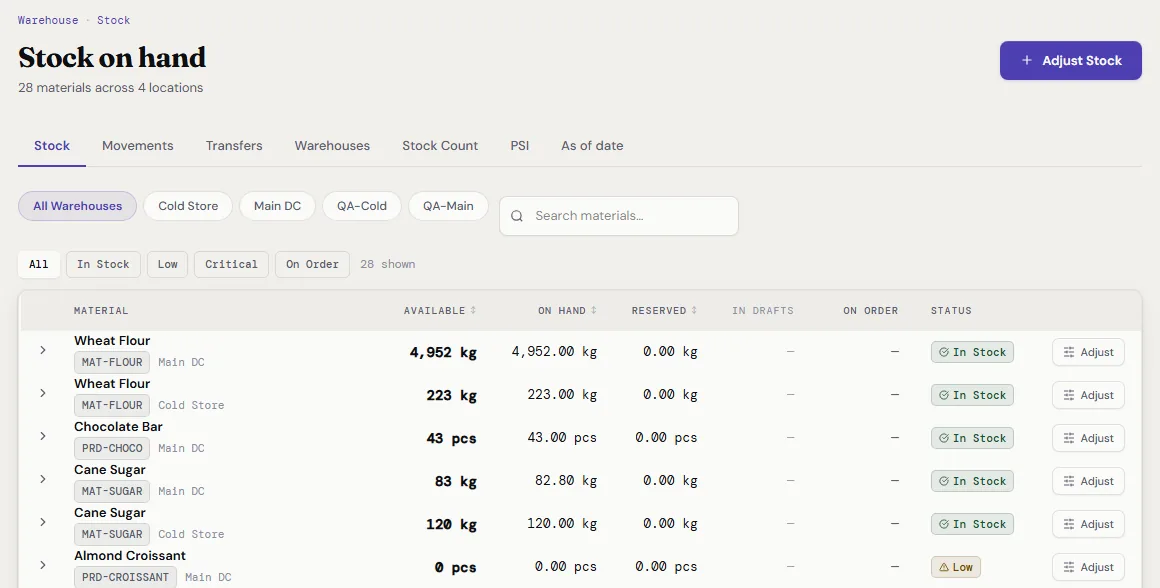
The Stock on hand screen: tabs for stock, movements, transfers and warehouses, warehouse filters, and a table of materials with available, on hand and reserved quantities and an In stock or Low status.
Stock on hand by warehouse. Test data.

Production and purchasing understand formulas: a raw-material shortage turns into draft purchase orders

  • Formulas in percentages or quantities, batch size, yield and scrap, versions, substitutes.
  • A production order reserves materials, consumes them by lot and creates a finished lot with its genealogy; under-yield and losses are recorded explicitly.
  • Purchase orders: minimum-order and pack-size rules, approval above a threshold, partial receipts, matching of order, receipt and bill, freight and duties spread into cost.
  • Shortage planning: demand plus minimum stock minus on-hand minus on-order.
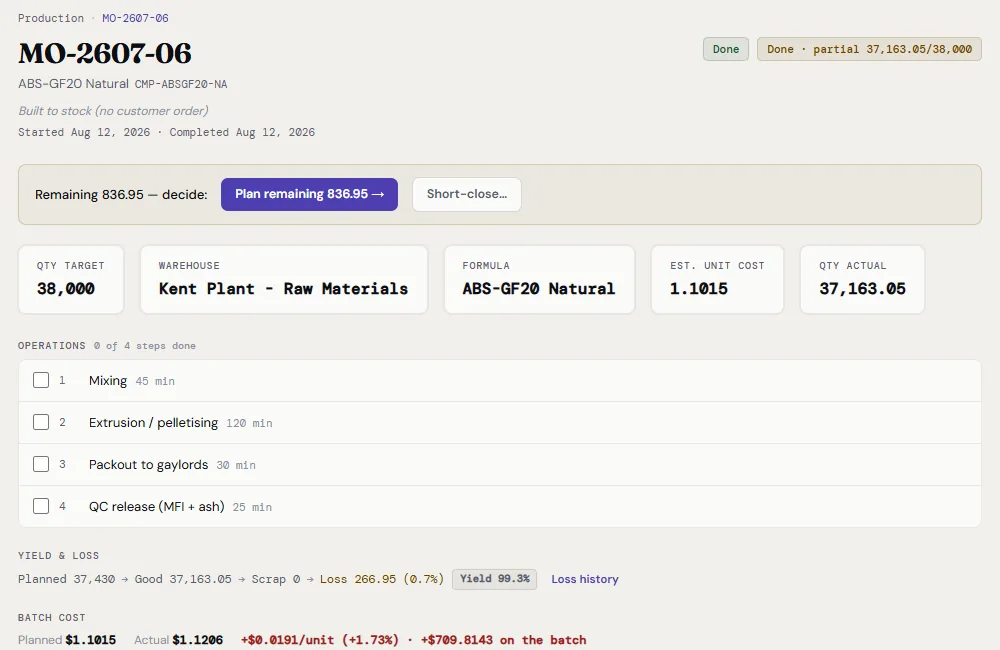
A production order screen: target quantity, warehouse, formula and unit cost cards, a list of four operations, and yield, loss and batch cost figures.
Production order: operations, yield and loss, batch cost. Test data.

A customer order decides where the goods come from: stock, make, buy or send to a processor

  • Flow: quote, order, activation, partial shipments, invoice, return. On activation, reservations, production orders and purchase orders are created in one step.
  • Customer credit control: warn, require approval, or block.
  • Subcontracting: your own materials go to a processor, the processor's rates are applied, its bill is reconciled, and losses are recorded with a responsible party.
  • Margin is visible on every order.
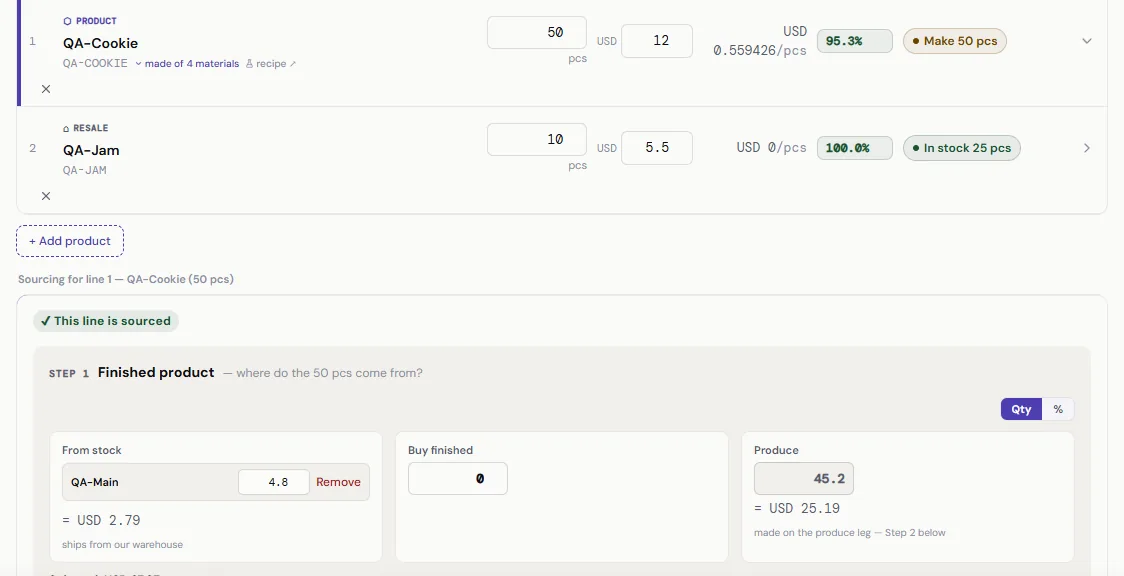
The order window: two order lines, each with a quantity, price, margin and a sourcing badge such as Make 50 pcs or In stock 25 pcs, and a sourcing panel splitting one line between stock, buying and producing.
Order window: each line gets its source — from stock, buy or produce. Test data.

Documents follow your own forms, and accounting is connected rather than replaced

  • Customer invoices, quotes, bills of lading and packing slips are generated in Excel in the layout you already use, then stored and attached to the record. PDF output is in progress.
  • QuickBooks is the first accounting connection: invoices and orders go out, payments and the balance sheet are read back. Every exchange is visible in a log with a retry button. Connecting live QuickBooks companies follows Intuit's review of the app.
  • We don't replace accounting; further accounting systems are connected the same way.
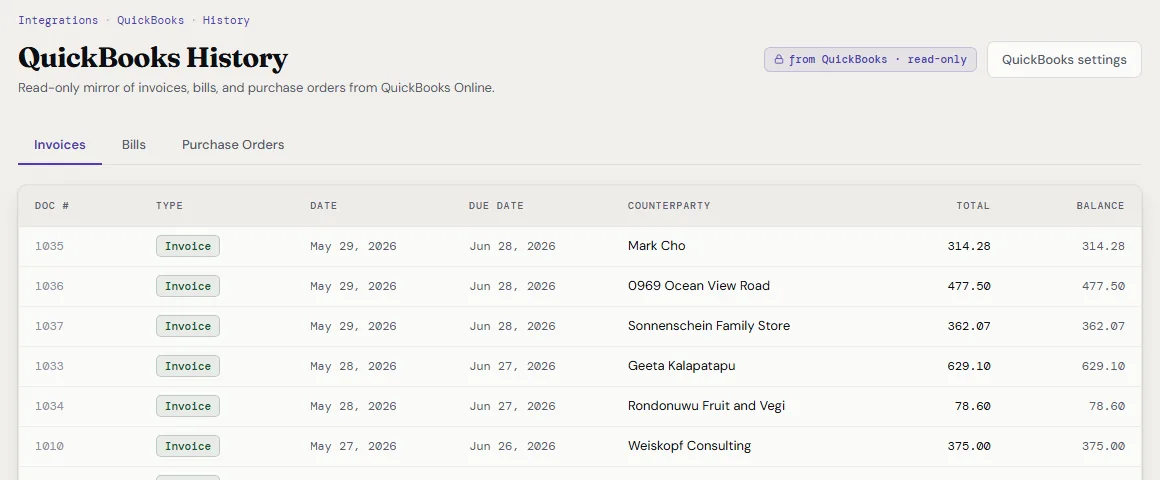
The QuickBooks History screen: a read-only mirror of invoices, bills and purchase orders, with a table of invoice numbers, dates, counterparties, totals and balances.
Invoices from the accounting system inside the product. QuickBooks sandbox, test data.

A public API

Connect your other software — a website, scales, labels, reports or your own AI agents. Everything a user sees on screen goes through the public API, the same one our own interface runs on. An access key never gets more rights than the employee who issued it. Reading is in the base; writing is a $99 module.

Process control

Closer to an ERP than to an inventory app — without an implementation project

We make the control mechanisms of a full ERP available to a company of ten people. Here is what is there, and what is not yet.

As in an ERP — already there

  • On-hand stock is derived from a movement ledger: any number can be explained and rebuilt as of a date
  • Purchase approval above an amount; nobody approves their own order
  • Matching of order, receipt and bill, with the reason for a difference
  • Customer credit limit: warn, require approval or block
  • Lot genealogy and a recall report — in the base
  • Freight and duties spread into product cost
  • Role-based permissions; a log of actions by people and the AI
  • Public API in the base

In an ERP — not in ours yet

  • General ledger — on purpose: we connect your accounting software
  • Labour and overhead in product cost
  • Capacity-based production scheduling
  • Scanning and labels
  • Demand forecasting
  • Multi-level formulas
  • US sales tax

Pricing

Built from a base, modules, an industry pack and services: you pay for what you use

Per month, per company, unlimited users.

Base

from $249

Core, with lots and traceability, customer invoices, a read API and AI questions about your data. No limits on users, warehouses or orders.

Add what you need

  • Formula-based production+$299
  • Subcontracting+$169
  • Customer portal and CRM+$189
  • Industry pack+$99
  • AI assistant: documents and actions+$160
  • Write API+$99

All-inclusive cap

$999

Whatever you switch on, the monthly bill stops here.

  • Public prices
  • Lots and traceability always in the base
  • No charges per user, order or warehouse
  • No annual lock-in

The only cap is the monthly AI budget, set per company.

Comparison

A comparison by facts anyone can check on the vendors' sites

What is included, what is sold separately, what is missing — including where competitors are stronger today.

Scroll the table sideways to see every vendor.

ainventry compared with Katana, Cin7 Core, MRPeasy and Business Central
Feature ainventry Katana Cin7 Core MRPeasy Business Central
Formulas in percent with a batch sizeIncludedNoNoNothird-party
Lots and expiry datesIncluded+$249Includedfrom $69 / userIncluded
Purchase approval above an amountIncludedNono threshold$99 / userIncluded
Matching of order, receipt and billIncludedNoNoNoIncluded
Customer credit limitIncludedNoIncludedIncludedwarning only
Issues its own customer invoicesIncludedNoIncludedIncludedIncluded
APIIncludednot in Coreadd-on$149 / userIncluded
AI reads documentsIncludedcustomer's own AI+$79Noper credit
AI performs actions after confirmationIncludedpartlyNoNopartly
Customer portalin the code, being finishedNo≈ +$119from $69 / userthird-party
Where competitors are stronger today
Labour and overhead in product costNo+$199add-onIncludedIncluded
Barcode scanningNo+$149Included$99 / userpartly
Capacity-based production schedulingNopartlyadd-onIncludedIncluded
Built-in general ledgerNoNoNoIncludedIncluded
  • included
  • no
  • a price means a paid add-on or plan

Sources: vendors' public pages (price pages and help centres), checked September 2026. Prices and limits are subject to change. Not tested in live accounts. The Cin7 portal price is a partner's estimate. The ainventry column follows the product code.

Book a demo

See ainventry on your own scenario

Tell us about your business. We can show the product on a call, or record a short video if that is easier.

Fields marked with an asterisk are required.